▷ your-video.mp4+
↖Drop in your video.
Drag recordings into Editional, or choose Add videos. Files stay on your PC.
Auto Edit, voiceovers, thumbnails, and video details.
Free early access · Windows 64-bit · No account needed in the app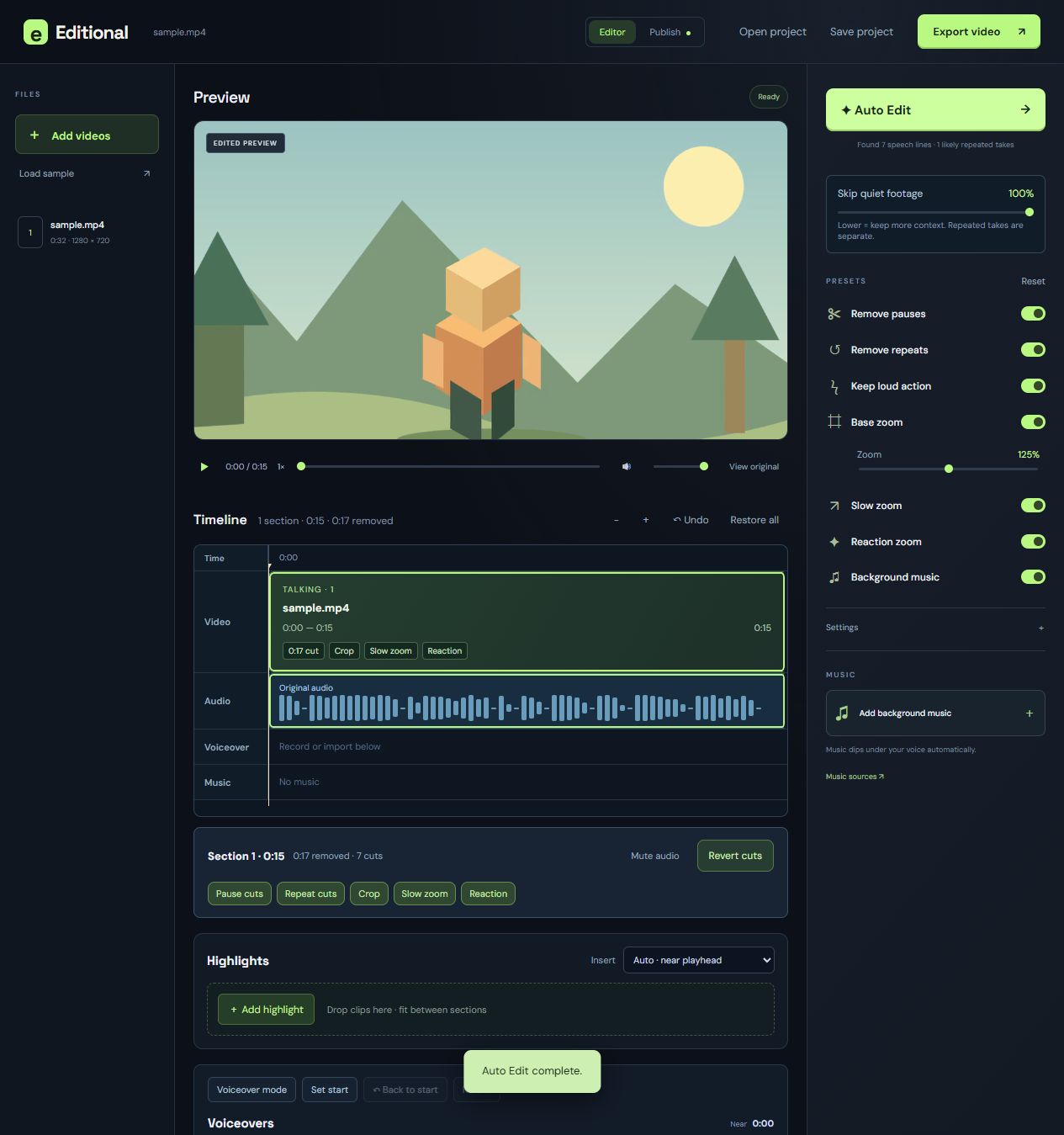
Start with an automatic cut, then adjust the details.
Drag recordings into Editional, or choose Add videos. Files stay on your PC.
Find speech and activity, trim quiet gaps, and spot likely repeated takes.
Adjust cuts and presets, then export your video.
Large sections keep the timeline readable. Video, game audio, microphone, voiceovers, and music have separate tracks. Split at the playhead, then delete selected parts with Delete or Ctrl+X. Crop settings stay with each part. Base zoom starts at 125%.
Try the switches.Quiet gaps trimmed. A gentle crop. A slow zoom while you talk.
Enter Voiceover mode to see cut footage. Set a start point, record, and return with Back to start.
Retake replaces the previous take at that point after the new recording succeeds.
Editional checks for updates on launch. Download an update, then choose Update & restart.
Unsaved edits prompt you to save first and reopen after the update.
Add clips in Highlights to insert them between existing sections.
Use a suggested break near the playhead or choose the position yourself. Highlights stay when Auto Edit runs again.
Cut out assets, choose video scenery, and start with one of three editable layouts.
Move assets and text, crop or blur the background, and add circle shadows. Refine cutout edges before exporting.
Local speech detection finds spoken sections, and word timings help remove repeated takes and restarts. Quiet gameplay is trimmed even when the picture moves. Narration protects the footage it needs. Highlights receive the same cleanup. Skip quiet footage controls how much quiet context stays: 100% cuts it all; lower values keep more. Removed footage stays off the timeline until restored. Review before exporting.
You can enter topics to flag matching words, and reaction cues get marked for review. This first version doesn’t understand stories or judge audience engagement. You make the final call.
The desktop app is free early access and needs no account or API key. Internet is needed to download the installer and the English speech model once (about 142 MB). After that, editing runs locally.
Yes. Assign game and microphone streams in Audio tracks. Each has its own lane and volume control in preview and export. Combined mixes stay unused when isolated tracks are available. A recording with only one mixed stream needs separate tracks recorded in OBS for independent control.
Yes. Choose an audio file, set its volume, and Editional loops it beneath your edit, dipping it under the source audio. Nintendo-style listening references are included as ideas; Nintendo recordings and their licenses are not bundled.
Add multiple video recordings at once, record or import voiceovers, and add one music bed per project. MP4/H.264 gives the best preview compatibility. The app can analyze other common formats through FFmpeg. Exports are H.264/AAC MP4 at 30 fps, up to a width of 1920 pixels. Save an Editional project to continue later.
This is an unsigned Windows 64-bit early-access build. Windows may show an unknown publisher notice. Speech recognition and movement estimates can be wrong. Review automatic cuts before sharing. The app includes a sample to try.